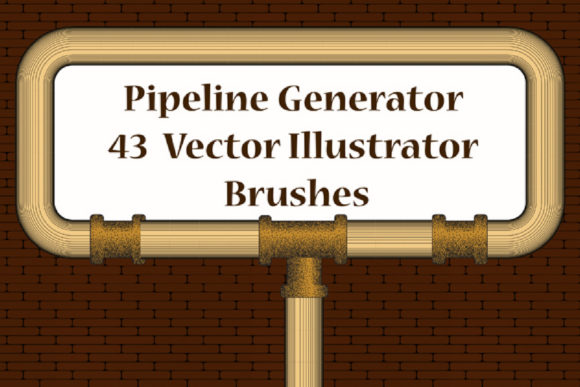
43 Pipes Illustrator Brushes: Industrial Design Assets
If you are looking to break away from standard geometric shapes and add some industrial flair to your vector work, the 43 Pipes Illustrator Brushes set is a design asset you should have in your toolkit. This collection goes beyond simple lines; it offers a robust system for creating complex piping networks, ornamental railings, and mechanical borders. For graphic designers, content creators, and small business owners, this package provides a practical way to introduce texture and depth into branding materials, packaging, and digital content without requiring advanced vector drawing skills.
The Aesthetic: Industrial Meets Decorative
The core appeal of this collection lies in its versatility. The 43 Pipes Illustrator Brushes are not just about drawing plumbing lines; they are about creating structure. The set includes 36 pipe conduit pattern brushes featuring various fitting nozzles and connectors. This allows you to create continuous, seamless lines that look like solid metal or plastic piping. However, the visual application extends far beyond utility. These brushes function beautifully as decorative borders and friezes.
Imagine a vintage travel poster or a retro-futuristic branding concept. The pipes in this set can be adapted to create "railing ribbons" or edging that frames your central imagery. Because the brushes are vector-based, they maintain their crispness whether you are designing a massive billboard or a small social media icon. The aesthetic is distinctly industrial, but with the right color palette—perhaps a shiny chrome gradient for a modern look or a matte texture for a steampunk vibe—they can fit into modern typography layouts and editorial designs with ease.
Practical Applications for Designers and Creators
When it comes to logo design or creating a distinct brand identity, consistency is key. The 43 Pipes Illustrator Brushes allow you to build a visual language that is recognizable and unique. For a craft brewery, a mechanic’s garage, or a tech startup focusing on "plumbing" the depths of data, these brushes provide immediate thematic relevance. You can quickly draft a "pipeline plexus" to serve as a background texture for a website header, giving the layout a sense of engineering and precision.
For packaging design, the utility is just as strong. The included 7 scatter brushes—featuring manometers, thermometers, and faucets—add character to labels. These elements are perfect for creating a "blueprint" aesthetic. Instead of using static clipart, you can use these scatter brushes to add randomized, organic-looking technical details to your packaging. This adds a layer of authenticity that stock images often lack.
Furthermore, content creators and marketers can use these assets to enhance social media graphics. A "step cadre" or a piping frame drawn with these brushes can instantly highlight a call-to-action or a quote. Because the brushes handle the complexity of the joints and nozzles automatically, you save significant production time. This efficiency is vital for entrepreneurs and bloggers who need to produce high-quality visuals consistently.
Flexibility and Technical Integration
A major strength of this collection is its adaptability. The 43 Pipes Illustrator Brushes are designed for ease of use. You can easily adjust the color, size, and thickness of the strokes to match your project's specific needs. Whether you are working on a dark mode UI design or a light, airy print layout, the pipes can be styled to fit. They are compatible with Illustrator CS6 and above, ensuring that even if you are working with slightly older software versions, you can still utilize these design assets.
The package also includes Ai Illustrator 10 and EPS 10 original files, which is a thoughtful inclusion for those who might need to open these files in different vector software or legacy systems. This broad compatibility ensures that the asset remains useful across different workflows and team environments. You aren't locked into a specific ecosystem, which is a common frustration with some premium font and brush packages.
Streamlining Your Workflow
The true value of the 43 Pipes Illustrator Brushes is realized in the workflow. Drawing complex piping by hand—ensuring that every joint connects perfectly and that the perspective is correct—is tedious. These brushes automate that process. You simply draw a path, and the brush applies the complex pipe profile along that line. This allows you to focus on composition and color theory rather than technical construction.
Included in the download is a PDF help file with screenshots. This is an essential resource for designers who might be new to custom brushes. It demystifies the installation process and offers tips on how to manipulate the brushes for maximum effect. Whether you are a seasoned graphic designer or a hobbyist exploring Adobe Illustrator, this guidance ensures you can start creating immediately without a steep learning curve.
Beyond the Obvious: Creative Font Pairing and Texture
While these are not typefaces in the traditional sense, they interact with text in powerful ways. Consider using these pipes to underline a bold, industrial sans serif font. The mechanical nature of the pipes contrasts beautifully with elegant serif fonts, creating a vintage-technical aesthetic. If you are working on an editorial design piece, such as a magazine spread about architecture or engineering, using these pipes as decorative elements can tie the imagery and the text together, creating a cohesive visual hierarchy.
They also work well in tandem with other styles. For instance, pairing a rough, hand-drawn script font with the rigid, mechanical lines of the pipes creates an interesting tension that draws the eye. This kind of contrast is a staple of effective web design and advertising, where grabbing attention quickly is paramount.
Ultimately, the 43 Pipes Illustrator Brushes set is a robust, functional, and highly stylized tool. It offers a unique solution for adding industrial texture and structural elements to a wide range of projects. From intricate vector illustrations to quick social media posts, these brushes provide a professional polish that standard tools cannot match. If you find this asset useful for your creative work, a positive rating helps support the creation of more high-quality design resources.