Dynamic Motion with Liquid Splash Illustrator Brushes
Static designs often struggle to capture the raw energy of a splash or the fluid nature of a pour. In the world of digital art, achieving that level of organic realism usually requires tedious manual drawing or searching for difficult-to-integrate stock images. However, Liquid Splash Illustrator Brushes offer a specialized solution that bridges the gap between flat vector graphics and dynamic, fluid motion. This collection is not merely a set of random shapes; it is a toolkit designed to introduce realistic fluid mechanics into your Adobe Illustrator workflow.
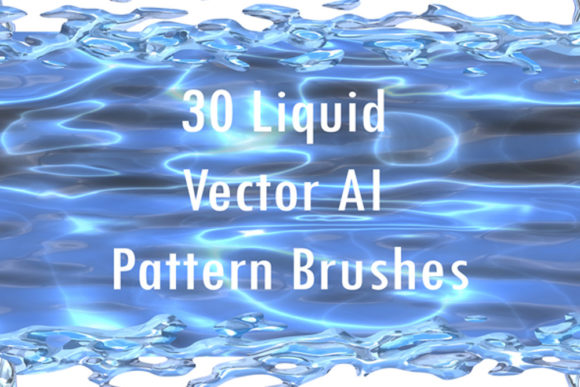
The core appeal of these brushes lies in their ability to mimic the unpredictable beauty of fluids. Whether you are looking for the clean translucence of water, the rich opacity of milk, or the high-contrast sheen of liquid silver and mercury, this collection provides the necessary assets. Unlike standard vector shapes that look rigid and artificial, these brushes create a sense of movement. They are designed to follow your pen strokes, turning a simple line into a ribbon of splashing liquor or a frieze of scattered droplets. This capability allows you to decorate artwork with a level of authenticity that resonates with viewers who are accustomed to high-end visual content.
Practical Applications in Modern Design
Understanding where to use Liquid Splash Illustrator Brushes is just as important as knowing how to apply them. Because they are vector-based, they are incredibly versatile across different media. For packaging design, these assets are invaluable. Imagine a beverage label where the liquid splashes are not generic clip art, but custom elements that wrap around the typography, creating a sense of freshness and immediacy. By changing the color and size of the brushes, you can match the specific hue of the product being sold, ensuring brand consistency.
In the realm of editorial design and publishing, these brushes can break the monotony of standard layouts. A magazine cover or a blog header featuring a metallic mercury splash can instantly convey a theme of technology, science, or futurism. For social media graphics, where attention spans are short, the visual impact of a fluid border or a splash background can stop a user from scrolling. It adds a layer of professional polish that distinguishes a small business's marketing materials from amateur attempts.
Furthermore, these brushes are excellent for logo design and brand identity. While a purely liquid logo might be too niche for a law firm, it works perfectly for nightclubs, cleaning services, car washes, or creative agencies. The "personality" of these brushes is energetic, chaotic, and vibrant. They communicate that a brand is dynamic and modern. By using the brushes to create a custom typeface effect—such as splashes interacting with the serifs of a serif font or the curves of a script font—you can create a premium font aesthetic without the cost of licensing a custom typeface.
Mastering the Toolset: Integration and Usability
One of the most significant advantages of this specific collection is its focus on usability. The package includes 30 distinct pattern brushes, but it also provides the original Ai Illustrator 10 and EPS 10 files. This is a crucial detail for professionals who need to maintain compatibility across different software versions or collaborate with teams using older systems. The inclusion of a PDF help file with screenshots ensures that even designers who are new to custom brushes can quickly get up to speed.
The ability to manipulate the color, size, and thickness of these splashes cannot be overstated. In web design, for example, you might need a subtle water splash for a spa website that uses soft pastels. Conversely, for a poster promoting a music festival, you might need a thick, neon-colored liquor flood. Because these are vector design assets, they scale infinitely without losing resolution. You can use a single brush stroke to create a massive background element for a billboard or a tiny icon for a mobile app.
When evaluating how these brushes fit into your workflow, consider the concept of visual hierarchy. A liquid splash naturally draws the eye due to its irregular edges and contrast. Using these brushes strategically can guide a viewer’s attention to a specific call-to-action or a key piece of information. However, moderation is key. Overusing splashes can clutter a design and reduce readability. The best approach is often to use them as accent elements—perhaps as a replacement for a bullet point in a list or as a dynamic underline beneath a headline.
Elevating Your Creative Output
For content creators and marketers, the goal is always to produce work that feels current and high-quality. Liquid Splash Illustrator Brushes provide a shortcut to achieving that modern typography and illustration style that is currently trending in digital spaces. They allow you to experiment with font pairing in a unique way; imagine pairing a clean, sans serif font with a background of chaotic silver splashes. The contrast between the structured text and the organic brush strokes creates a compelling visual tension that engages the audience.
Ultimately, this collection is about expanding your creative vocabulary. It moves beyond the standard tools of lines and circles to offer something with texture and life. Whether you are a hobbyist working on a personal scrapbook or a professional agency handling a major rebrand, having a library of high-quality, editable fluid brushes ensures that you are prepared for any project that requires a touch of realism and excitement. By integrating these assets into your standard toolkit, you enhance your ability to deliver professional, impactful, and visually stunning results. If the work meets your standards, taking a moment to rate the product helps support the creation of more high-quality resources for the design community.