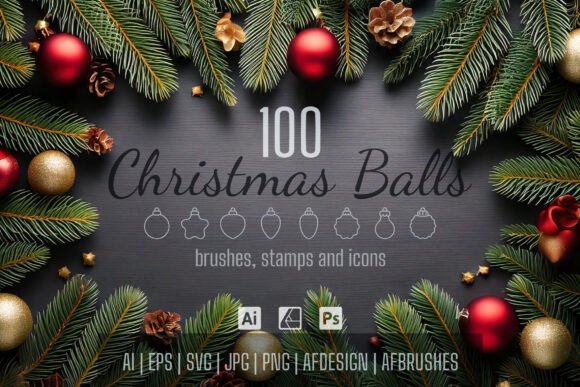
100 Christmas Ball Icons and Brushes for Festive Designs
The holiday season brings a unique pressure for designers and content creators. Whether you are a small business owner trying to make your seasonal packaging pop, a blogger adding festive flair to posts, or a marketer crafting the perfect email campaign, the need for high-quality, versatile assets is constant. Finding a resource that balances professional polish with creative flexibility is rare. That’s where a comprehensive toolkit like the 100 Christmas Ball Icons and Brushes collection becomes an essential part of your design arsenal, moving beyond simple clipart to offer real, editable creative power.
A Toolkit Built for Modern Workflows
This isn't just a folder of static images. The true value of this pack lies in its native file compatibility. You receive AI and EPS files for Adobe Illustrator users, along with AFDESIGN files specifically optimized for Affinity Designer 2. This means you are getting premium font and vector-level assets that you can manipulate, scale, and colorize without losing quality. For those working on web design or social media graphics, the inclusion of SVG, JPG, and PNG files with transparent backgrounds ensures you can drag and drop elements immediately into your workflow.
The visual style of these icons leans into the classic, nostalgic charm of Christmas ornaments while maintaining a clean, modern aesthetic. They aren't overly complex, which makes them perfect for infographics, logo design elements, and detailed packaging design. The brush sets—spanning Affinity Photo, Adobe Illustrator, and Adobe Photoshop—allow you to add texture and depth to your compositions, turning flat designs into dynamic visual stories.
Practical Applications for Brand Identity and Marketing
Consistency is the backbone of strong brand identity. When the holidays roll out, your visual language needs to adapt without straying from your core look. These assets allow for that adaptability. Because the files feature editable strokes and expanded paths, you can match the ornament colors exactly to your brand’s hex codes. This level of customization is crucial for maintaining professionalism. A generic red ball looks like stock art; a ball that matches your specific brand palette looks like custom editorial design.
For entrepreneurs and marketers, the applications are vast. Imagine creating a cohesive set of holiday coupons, gift tags, and social media headers using the same visual thread. The scatter and spacing brushes included for Illustrator are particularly useful for creating seamless backgrounds or textured borders for print materials. This kind of resource helps bridge the gap between amateurish holiday attempts and professional, high-converting seasonal campaigns.
Enhancing Visual Hierarchy and Readability
Good design is about guiding the viewer's eye. These icons and brushes serve as excellent tools for establishing visual hierarchy. A well-placed Christmas ball icon can act as a bullet point in a holiday menu, a divider in a newsletter, or a focal point on a greeting card. They help break up text blocks, improving readability and keeping the audience engaged. When used as part of a larger font pairing strategy—perhaps next to a bold sans serif font or a flowing script font—they add context and festive energy without overwhelming the typography.
Integration with Typography
While these are graphic assets, they play a significant role in typographic compositions. Think of them as design assets that complement your typeface choices. If you are working on a vintage-style holiday poster, the icons can sit alongside a serif font to reinforce the classic feel. Conversely, their clean vector lines work beautifully with modern typography and handwritten font styles, offering a balance between playful and polished. The ability to change opacity and size means you can use them as subtle watermarks or bold headlines, depending on your project's needs.
Why File Format Variety Matters
A common frustration in the creative world is downloading an asset only to find it doesn't work with your software. This collection solves that problem by prioritizing compatibility. The documentation provided ensures you know exactly how to load the brushes into your specific version of Photoshop or Illustrator.
- Vector Editing: Use the AI, EPS, or AFDESIGN files for total control over shape and color.
- Raster Work: The brushes are perfect for digital painting or adding texture to photos in Photoshop or Affinity Photo.
- Quick Layouts: The PNG and SVG files are ready for Canva, Procreate, or quick web updates.
This versatility makes it a practical investment for anyone running a creative business. You aren't just buying 100 images; you are buying a flexible system that adapts to different client needs and project scopes.
Evaluating the Fit for Your Project
Before integrating any new creative font or graphic set, it’s wise to evaluate the fit. Ask yourself if the style aligns with your target audience. For most holiday-related content—whether it’s a family-oriented blog, a high-end boutique, or a corporate newsletter—these ornament styles hit the right note of festive cheer. They are versatile enough to be used in both commercial and personal projects, provided you adhere to standard licensing agreements (which are detailed in the included PDF).
Ultimately, the goal of any design asset is to make your life easier and your work better. By having a robust set of 100 distinct options, you ensure that your holiday designs remain fresh and unique year after year, saving you time and elevating the quality of your visual communication.