Festive Design, Instantly: The Christmas Procreate Stamp Brush Set
The holiday season is a whirlwind for creative professionals. Between client deadlines, personal projects, and the sheer volume of content needed for marketing and social media, the pressure to produce high-quality, festive artwork can be intense. This is where a well-curated design asset like the Christmas Procreate Stamp Brush Set transitions from a nice-to-have to an essential tool in your digital toolkit. It’s not about replacing your skill; it’s about augmenting your workflow with specialized, high-quality elements that save time and elevate output.
More Than Just Stamps: A Design System for the Season
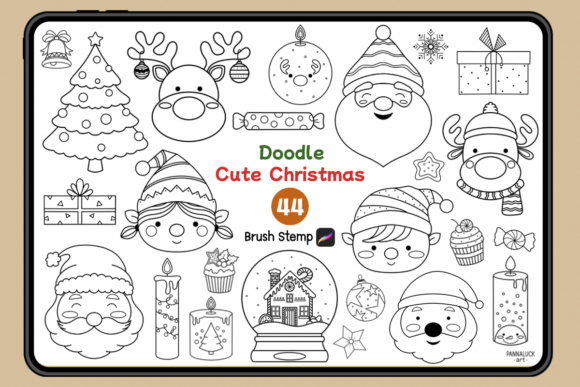
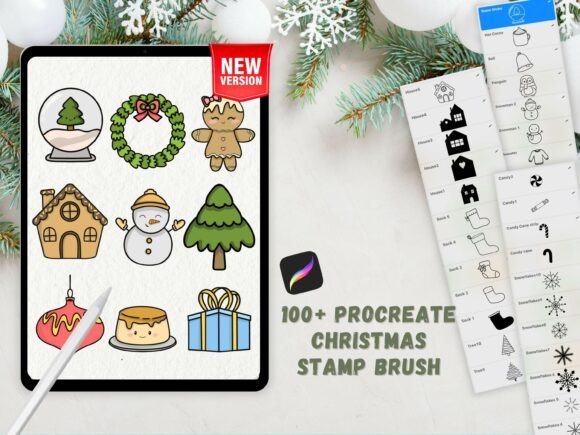
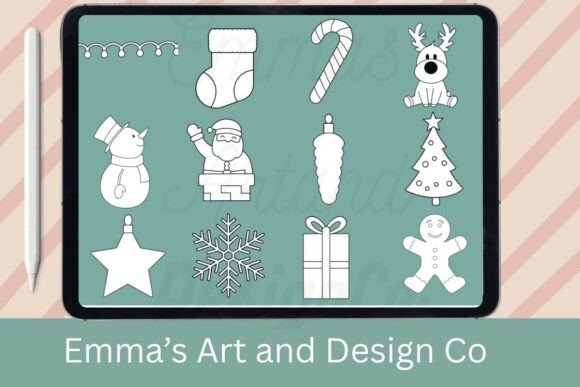
At its core, this set provides 12 hand-drawn Procreate stamps: Santa, a Christmas Tree, a Gift, a Candy Cane, a Snowman, a Reindeer, a Bauble, Christmas Lights, a Present, a Snowflake, a Gingerbread Man, and an Ornament. The visual style is key here. These aren't generic, overly simplistic clip art images. They possess a hand-drawn, slightly textured personality that feels authentic and warm, avoiding the sterile look of perfect vector graphics. This style strikes a crucial balance—it’s detailed enough to look professional in a logo design or packaging design for a small business, yet charming and whimsical enough for personal greeting cards or social media graphics. The inclusion of a FREE Christmas Color Palette (.swatches file) is a thoughtful touch, ensuring color harmony across your project and reinforcing a cohesive brand identity if you’re creating a series of assets.
The real value of this creative font analog isn’t just in the individual icons, but in how they function as a system. When you use these stamps, you’re not just placing a picture; you’re employing a consistent visual language. A series of Instagram stories, a set of digital planner stickers, or a collection of holiday sublimation designs will share the same line weight, textural quality, and artistic hand. This consistency is foundational to professional-looking work and builds instant recognition with your audience.
Practical Applications: From Digital Planners to Product Packaging
Understanding where a tool like this excels is half the battle. Let’s break down its practical use across different projects:
- Digital & Social Media: The stamps are perfect for creating eye-catching social media graphics, Instagram Stories, and Pinterest pins. Use a single stamp as a bold focal point or combine several to create a festive scene. For digital planners and stickers, they offer a quick way to add seasonal flair without drawing from scratch every time.
- Print & Physical Products: Think beyond the screen. These high-resolution stamps are ideal for sublimation designs on mugs, ornaments, and apparel. They work beautifully in packaging design for gift tags, wrapping paper patterns, and product labels for holiday-themed items. The editorial design of holiday catalogs or brochures can use these icons to break up text and add visual interest.
- Branding & Marketing: For small businesses, seasonal marketing materials are crucial. This set allows entrepreneurs and marketers to quickly produce professional-looking assets for email headers, website banners, and promotional materials that align with a festive campaign. It helps maintain a polished brand identity throughout the holiday rush.
- Personal & Hobbyist Projects: The joy of creating shouldn’t be hindered by technical hurdles. For crafters and hobbyists, these stamps lower the barrier to entry. You can design custom Christmas cards, family newsletters, or even personalized gift wrap with a few taps, making the process fast, fun, and professional.
Integrating Festive Assets into Your Workflow
How you use a tool defines its impact. Here’s some practical guidance for getting the most out of your Christmas Procreate Stamp Brush Set:
Evaluating Project Fit: Before you start, ask: does this hand-drawn, festive style match the project’s tone? It’s perfect for joyful, celebratory, and traditional Christmas themes. For a more minimalist, modern, or corporate holiday campaign, you might use these stamps sparingly as accents rather than the main visual driver. Always test the stamp on your canvas to ensure its level of detail and texture works at the intended size.
Customization is Key: The instruction to “simply tap to stamp” is the beginning, not the end. A seasoned designer knows that the real magic happens in customization. After stamping, use Procreate’s tools to:
- Adjust Color: Use the provided palette or apply your own brand colors.
- Add Texture & Patterns: Use clipping masks to fill the stamps with watercolor textures, grain, or seasonal patterns.
- Integrate with Typography: Pair a stamped Santa with a script font for a classic greeting card feel, or use a sans serif font alongside a geometric snowflake for a more modern look. This is where thoughtful font pairing comes into play.
Building a Cohesive Series: The greatest strength of a design asset bundle is its built-in cohesion. Use all 12 stamps across a campaign to create a unified look. For example, a small bakery could use the Gingerbread Man on its logo, the Candy Cane on its social media posts, and the Gift/Present stamps on its packaging and gift certificates. This creates a memorable and professional visual hierarchy across all touchpoints.
In the end, the Christmas Procreate Stamp Brush Set is less about the stamps themselves and more about the creative possibilities they unlock. It’s a practical solution for a common creative challenge: producing abundant, high-quality, festive content under time constraints. By treating it as a versatile component within your broader design process—not a magic fix—you can leverage it to bring consistent, engaging, and professional holiday cheer to any project you undertake this season.