Elevate Your Artwork with 20 Fencing Pattern Brushes
When you're working on a design project that needs a touch of elegance, structure, or rustic charm, the details make all the difference. That intricate border on a vintage menu, the decorative frame on a wedding invitation, or the textured background on a poster—these elements often rely on specialized design assets. The 20 Fencing Pattern Illustrator Brushes pack is a toolkit built for exactly this purpose. It provides a versatile collection of vector brushes that mimic various fence and railing patterns, allowing you to add sophisticated decorative borders, frames, and textures to your artwork with ease.
More Than Just Lines: The Visual Language of Fencing Patterns
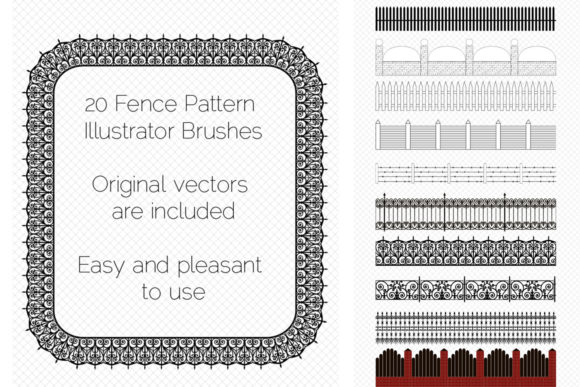
This collection isn't a random set of lines. Each of the 20 brushes represents a distinct style, from the classic sophistication of wrought-iron grating and forged borders to the natural, organic feel of wooden paling and rope protection. You'll also find utilitarian styles like barbed wire for edgier designs and structured patterns like brick fencing and lattice fences. The overall appeal lies in their ability to instantly convey a specific mood or era. A wrought-iron pattern can suggest heritage and craftsmanship, while a clean lattice fence brings a modern, geometric order. This makes them incredibly useful for projects where the visual style needs to communicate a clear personality, much like choosing between a serif font for tradition or a sans serif font for modernity.
Practical Applications Across Creative Projects
The real value of these pattern brushes is their flexibility. As a designer or entrepreneur, you can apply them in countless scenarios. Here’s where they truly shine:
- Branding & Identity: Use a forged border brush to create unique frames for a logo or business card, adding a layer of texture that supports a brand identity rooted in artisanal quality or strength.
- Editorial & Publishing: In editorial design, these brushes can create elegant chapter dividers, page borders for a cookbook, or decorative elements for a magazine layout, enhancing the visual hierarchy without overwhelming the text.
- Packaging & Product Design: A wooden paling pattern can give product packaging for organic goods a rustic, authentic feel, directly influencing brand perception.
- Digital & Web Design: Create distinctive section dividers on a website, stylized borders for social media graphics, or textured backgrounds for digital ads. They function as a creative font for your layout's structural elements.
- Personal & Craft Projects: From designing party invitations to creating custom art prints or scrapbook pages, these brushes offer a way to add professional-grade ornamentation to personal creations.
By integrating these patterns, you're not just decorating; you're building a cohesive design system. A palisade cadre used on a menu, a website header, and a storefront sign creates a recognizable visual thread, strengthening audience engagement and recall.
Working with the Brushes: A Designer's Perspective
Incorporating new assets into your workflow should be seamless. This brush pack is designed with that in mind, being compatible with Adobe Illustrator CS6 and later. The included Ai and EPS 10 files ensure broad accessibility. A key advantage is the control you maintain. You can easily adjust the color, size, or thickness of any pattern to fit your specific canvas and color palette. This adaptability is crucial for maintaining readability and scale in your designs—a pattern that works for a large poster might need to be simplified for a small business card.
When evaluating if these brushes fit your project, consider the following practical steps:
- Assess the Mood: Does your project call for ornate metalwork, natural wood, or industrial wire? Match the brush style to your project's emotional tone.
- Test for Scalability: Apply the brush to a path and scale it up and down. Does the pattern remain clear and effective at different sizes?
- Consider Pairing: Just like font pairing, combine these pattern brushes with other design elements. A delicate lattice fence might pair well with a light, script font, while a bold brick fencing pattern could complement a sturdy display font.
- Review the License: The pack includes a commercial license, allowing you to use the brushes in client work and for-sale products. Always verify the specific terms in the included documentation.
The included PDF help file with screenshots is a valuable resource, especially if you're less familiar with using pattern brushes in Illustrator. It guides you through the basics, ensuring you can start creating endless railing ribbons, friezes, and edging immediately.
Ultimately, the 20 Fencing Pattern Illustrator Brushes are more than a decorative novelty. They are a practical set of design assets that solve a common creative challenge: adding structured, thematic texture and border elements efficiently. By offering a range of styles within a single, easy-to-use format, they empower you to enhance the professionalism and distinctiveness of your work, whether for a client's brand identity or your own creative projects. If you find them useful, a rating helps other creators discover them too.